 OpenProgram Docs
Terminal TUI#
See tool permission modes and live changes for approval behavior and changes during a task.
The full chat interface for using OpenProgram without leaving the terminal. This page covers entering and exiting, keyboard shortcuts, and slash commands.
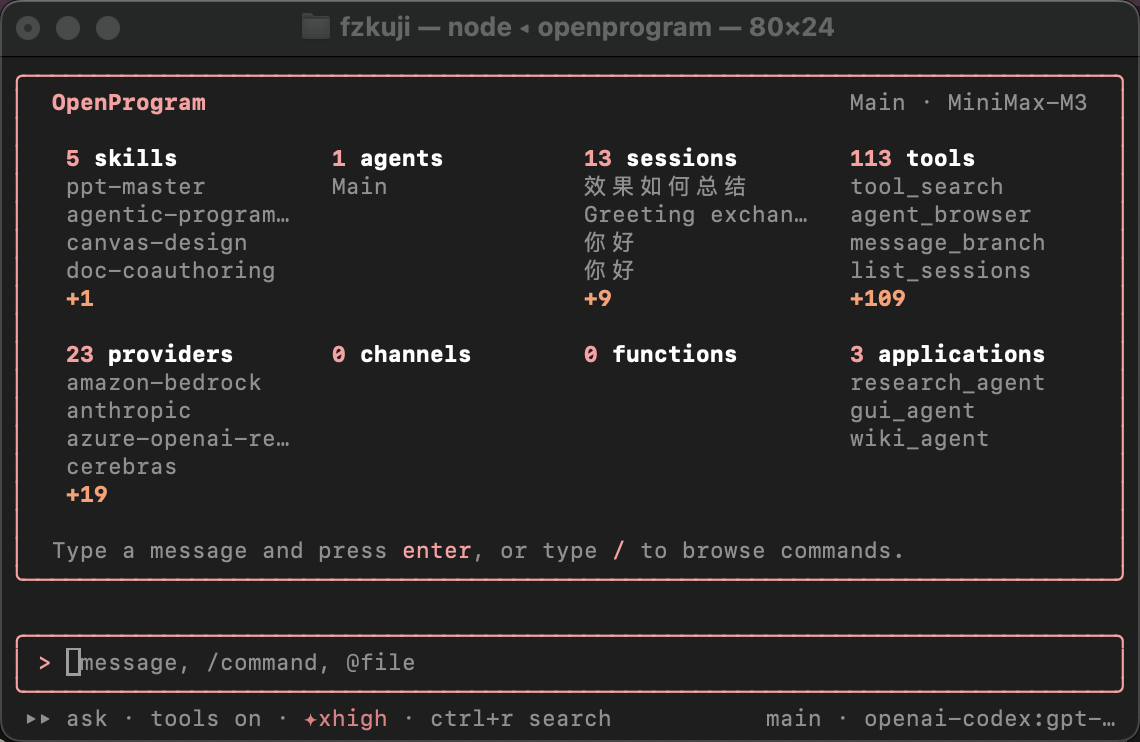
Entering and exiting#
openprogram tui      # straight into the terminal chat (alias: openprogram chat)
openprogram          # bare invocation first asks: terminal UI or web UI
openprogram tui --no-alt-screen  # inline mode; keep terminal scrollback
openprogram tui --screen-reader  # inline mode without mouse tracking
The release CLI includes a self-contained Node.js Ink interface on Windows, macOS, and Linux. It uses the terminal's actual raw-input capability rather than an operating-system allowlist: Windows Terminal, PowerShell under ConPTY, and modern integrated terminals get the full-screen interface. A terminal without usable raw input falls back to the built-in Python Rich interface with an explicit message. Both implementations connect to the same local worker over WebSocket and share sessions with the Web UI.
The full-screen interface requires both stdin and stdout to be terminals. Redirected or piped invocations skip Ink before it writes any ANSI frames and use the line-oriented fallback; use openprogram --print "..." for automation. The alternate screen preserves the shell's main-screen contents and restores them on exit. Cursor movement and deletion operate on complete Unicode grapheme clusters, so emoji, combining characters, and CJK input are not split while editing.
/copy uses wl-copy in Wayland sessions, xclip or xsel in X11 sessions, and clip.exe under WSL. Over SSH it avoids the remote graphical clipboard and uses OSC 52, including tmux passthrough and its paste buffer when available. Native clipboard helpers have a bounded timeout, so a stale display cannot freeze the TUI.
On Windows, Windows Terminal is recommended. Git Bash running in MinTTY may use the Rich fallback; running PowerShell inside Windows Terminal gets the full interface. The release carries its own Node.js executable, so users do not need to install Node.js for the TUI.
Exit: /quit, or press Ctrl-C twice quickly while idle.
To resume a past session: use /resume inside the TUI to pick one, or launch openprogram --resume <id> directly. Session ids are listed by openprogram sessions list.
With --profile <name>, startup diagnostics are written under that profile's state directory (~/.openprogram-<name>/logs/ink-startup.log) rather than the default profile.
Keys#
| Key | Action |
|---|---|
Enter |
Send |
? on an empty prompt |
Open the keyboard shortcut reference |
Alt+Enter |
Newline |
Esc |
Clear the input line; abort the current turn while generating |
Ctrl-C (while generating) |
Three-stage stop: first press warns, second stops gracefully, third forces |
Ctrl-C double press (idle) |
Exit |
↑ / ↓ |
Input history; navigate up/down when the completion menu is open |
Tab |
Accept file / slash-command completion |
→ (at end of line) or Ctrl+E |
Accept the autocomplete suggestion |
Ctrl+A / Ctrl+E |
Move to the beginning / end of the input when no suggestion is being accepted |
Ctrl+W |
Delete the previous word |
Ctrl+R |
Search saved contexts |
Shift+Tab |
Cycle permission profiles (ask → acceptEdits → plan → auto) |
Ctrl+K |
Command palette (covers all slash commands) |
PageUp / PageDown, Ctrl+U / Ctrl+D |
Scroll back by page / half page |
Home / End |
Jump to top / bottom |
Slash commands#
Type / to trigger completion. Common ones:
| Command | Action |
|---|---|
/help, /keybindings |
Command list and keyboard shortcut reference |
/model, /fetch-models |
Switch model, re-fetch the model list |
/effort |
Adjust thinking effort (levels in thinking effort) |
/new, /resume, /sessions, /session |
New session, resume, session list, current session info |
/rewind |
Roll the session back to a message |
/compact, /context, /clear |
Compact context, view context, clear screen |
/permissions, /sandbox |
Permission profiles and sandbox |
/login <provider>, /logout |
Provider login / logout (see auth and credentials) |
/agents, /agent |
Manage / switch agents |
/mcp, /tools, /memory |
Inspect and manage the same data as the corresponding Web UI pages |
/cost |
Token usage for this session |
/export, /copy |
Export the session, copy a reply |
/config, /theme, /bell |
Settings, theme, notification sound |
/doctor |
Health check |
/channel, /attach, /detach, /connections |
Chat-channel hookup and session routing |
/quit |
Exit |
/compact summarizes older complete turns, including their visible tool results,
while retaining recent turns. It changes the next model context; original
messages remain available in the session. The before/after token counts are local
estimates. A short history, a failed summary or a summary that saves no space
leaves the context unchanged.
Also available: /search, /review, /diff, /init, /browser, /welcome. The /help output is the authoritative full list.
Beyond these built-ins, the completion menu also lists every command from the unified command registry — skills, MCP prompts, plugin commands, and your own command files under ~/.openprogram/commands/ or <project>/.openprogram/commands/ (markdown with optional YAML frontmatter). Running one expands its body and sends it as the message, exactly like the Web composer: the TUI and the Web UI read the same registry, so a command defined once appears in both.
Tool continuations can compact completed text results within the same user message; no additional /compact command is required. Original execution records are retained.
Channel messages with non-string user or assistant text are ignored for that field. Existing background-session text is preserved, and malformed text does not become a transcript message.
When tool-result summaries are insufficient, older complete text-only execution history can be replaced in the next request by a task summary. All user messages and the latest assistant segment remain verbatim. Incomplete tool groups, multimodal input and signed reasoning are not eligible for this checkpoint. Checkpoints are reused only within the current invocation for the same model and unchanged source prefix; the DAG remains the durable record.
Summary requests process long text in bounded chunks and retry context overflow with smaller chunks. They share a finite call/time budget; failures leave the original history intact. If protected content alone exceeds the window, the request fails explicitly instead of silently dropping user instructions.